
TikTok LIVE discovery and Telegram alerts
A discovery bot finds LIVE events, reads their fields and sends matches through the configured alert channel. You still open TikTok to check conditions and participate.
A discovery bot finds LIVE events, reads their fields and sends matches through the configured alert channel. You still open TikTok to check conditions and participate.
A discovery bot finds LIVE events, reads their fields and sends matches through the configured alert channel. You still open TikTok to check conditions and participate.
From a user's perspective, discovery begins with active LIVE rooms, identifies Treasure Box or Goody Bag events, reads their fields and applies matching conditions. Suitable results can appear in a list or be delivered through a configured notification service. You do not have to open every room merely to see its detected event data.
Open the LIVE page, in your selected language, and choose Boxes. Read the countdown, Coins and ratio before pressing “Open LIVE”. Results are ordered by opening time, which provides a clear reading sequence. You can begin without setting up a separate Telegram bot.
Website Free has the box tab “Ratio 1” and the bag tab “Level 2–10”; other tabs need Plus or Pro. Free no longer has a 100-Coin or ratio-2 cap. Check Plans on the LIVE page for current access.
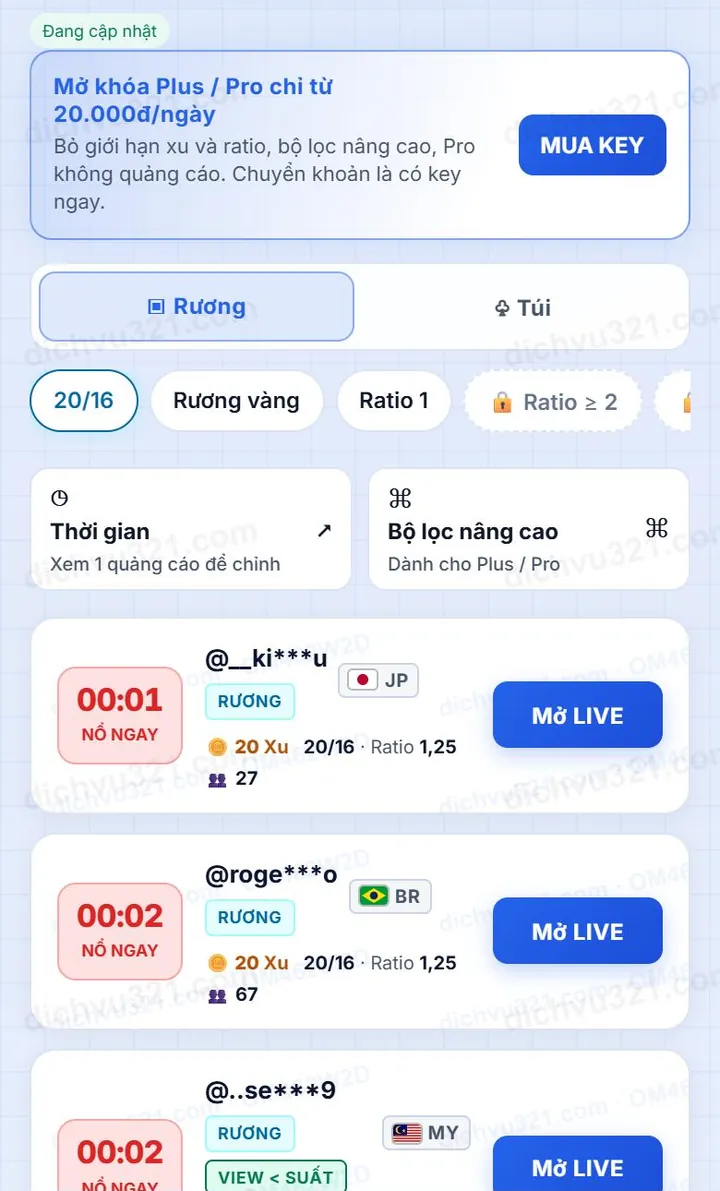
A Telegram service delivers matching event information to its configured destination. Before choosing one, identify whether you need box or bag alerts, which data filters matter and where notifications should arrive. A shared group and a separately configured bot have different scopes; neither should be mistaken for an automatic claiming service.
Read the Treasure Box bot information and filter details before discussing configuration. If you receive every event, you may struggle to read alerts in time. If conditions are too narrow, few events may match. Aim for messages relevant to the time you can spend.
Suppose two rooms have similar Coin totals but one event opens in ten seconds and the other in ninety. If switching apps takes you twenty seconds, the second leaves more preparation time. On the website, Plus and Pro can set “Time” to hide rooms that open too soon; Free cannot edit it yet.
For numerical comparisons, state the event type and ratio base. Ratio uses winner slots; a bag without winner slots uses participants; viewer count is separate. The data guide explains the calculation. A request such as 'only the best rooms' is unclear until you define the fields that matter to you.
LiveMira is an independent service and is not owned, sponsored, endorsed by or affiliated with TikTok or Telegram.
Choose a room in the Free list, then check the event in TikTok before participating.