
Find and join TikTok Coin events step by step
Choose a LIVE listing, read the event data, allow enough time to open TikTok, and check the result inside the app. Finding a room and receiving Coins are different steps.
Choose a LIVE listing, read the event data, allow enough time to open TikTok, and check the result inside the app. Finding a room and receiving Coins are different steps.
Choose a LIVE listing, read the event data, allow enough time to open TikTok, and check the result inside the app. Finding a room and receiving Coins are different steps.
Check that the official TikTok app opens normally on your device. Any TikTok sign-in belongs there. LiveMira does not require a TikTok password, verification code or cookie to browse its discovery list.
Allow time to switch apps and read conditions. If the types are unfamiliar, read the box and bag comparison; a bag without winner slots uses a different count for its ratio.
Visit the Free LIVE page. Choose Boxes or Bags, then a tab available to your plan. The updating list places earlier-opening events first.
Website Free has the box tab “Ratio 1” and the bag tab “Level 2–10”. Plus adds “20/16”, “Gold boxes”, “Ratio ≥ 2”, “Ratio ≥ 4”, “Hung boxes” and the bag tabs “Level 1” and “Level 0”; Pro adds “Lucky picks” and “Custom” for boxes and bags. Free no longer has a 100-Coin or ratio-2 cap.
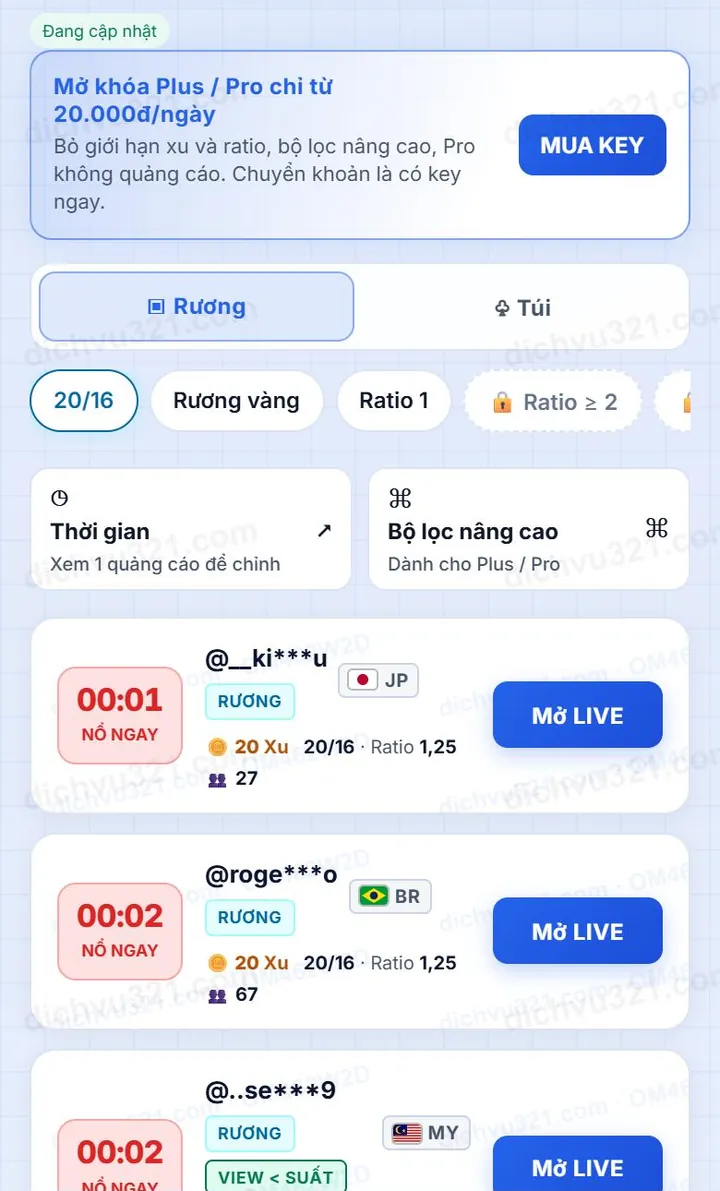
Read the creator, event type and countdown, then Xu, Ratio and View. Xu means Coins; View is the audience count. Bag rows also show participants. Web usernames are partly hidden. Any country label describes creator metadata, not your location or eligibility.
Coins belong to the event. Ratio uses winner slots; a bag without winner slots uses participants. Neither predicts odds or a personal payout. The data guide provides examples.
Press “Open LIVE”, beside the room. On a phone it opens the TikTok app (confirm any browser request); on a computer it opens the room on tiktok.com. Check that the event is active, read its conditions and participate yourself using TikTok's available actions.
The website only finds, filters and opens rooms; it does not tap or claim for you and does not guarantee a reward. LiveMira Auto, a separate Android app, can open boxes and bags automatically, but it does not guarantee Coins either. For an ended event, return to the fresh list. If TikTok never opens, use the opening checklist.
A browser may suspend the page while you use TikTok or lock the device. On return, inspect status and current countdowns, or press “Refresh ↻”.
Settings offers light or dark appearance, fonts, languages and “Sound alert”. Website background updates are not guaranteed.
If a problem repeats, record its time and message and use service information for contact details. Keep credentials out of reports.
LiveMira is an independent service and is not owned, sponsored, endorsed by or affiliated with TikTok or Telegram.
Choose a room in the Free list, then check the event in TikTok before participating.