
How to receive TikTok Coins in LIVE
Check the event conditions in TikTok, join before it ends, and confirm your personal result in the app. A detected event does not guarantee Coins.
Check the event conditions in TikTok, join before it ends, and confirm your personal result in the app. A detected event does not guarantee Coins.
Check the event conditions in TikTok, join before it ends, and confirm your personal result in the app. A detected event does not guarantee Coins.
Check that the official TikTok app opens normally on your device. Any TikTok sign-in belongs there. LiveMira does not require a TikTok password, verification code or cookie to browse its discovery list.
Allow time to switch apps and read conditions. If the types are unfamiliar, read the box and bag comparison; a bag without winner slots uses a different count for its ratio.
Visit the Free LIVE page. Choose Boxes or Bags, then a tab available to your plan. The updating list places earlier-opening events first.
Website Free has the box tab “Ratio 1” and the bag tab “Level 2–10”; other tabs need Plus or Pro. This is a limit of the Free plan, not a general TikTok condition, and Free no longer has a 100-Coin or ratio-2 cap. An empty list may simply mean no matching room right now.
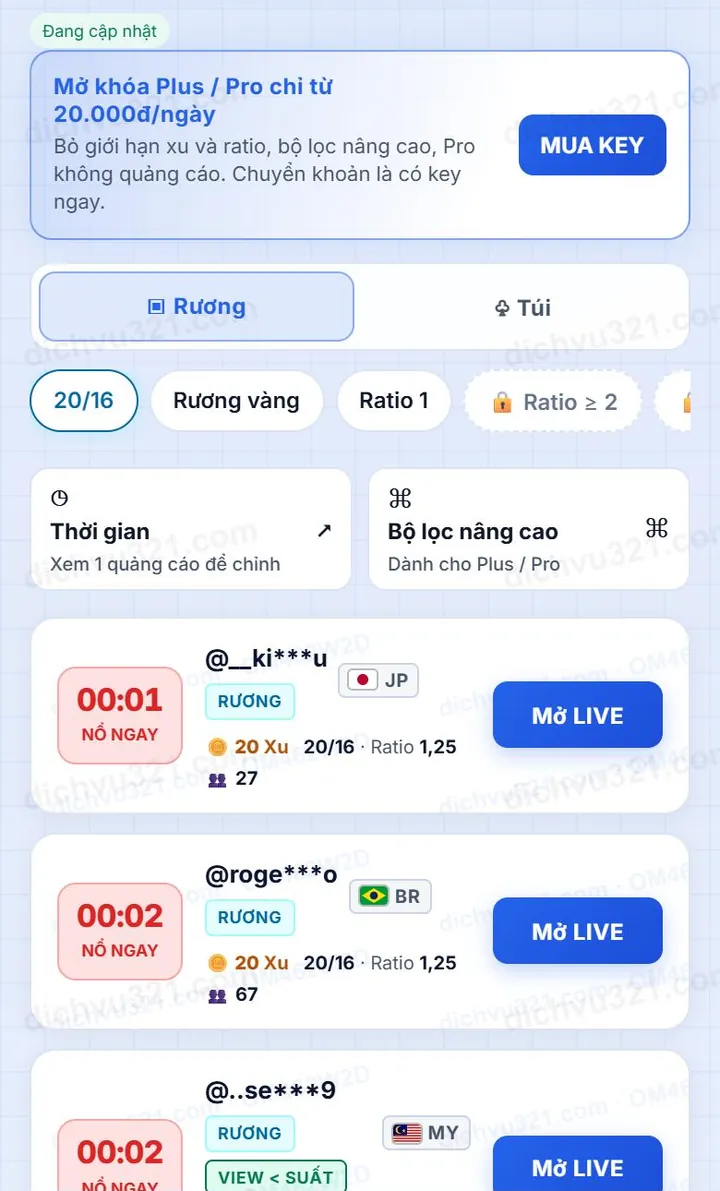
Read the creator, event type and countdown, then Xu, Ratio and View. Xu means Coins; View is the audience count. Bag rows also show participants. Web usernames are partly hidden. Any country label describes creator metadata, not your location or eligibility.
Coins belong to the event. Ratio uses winner slots; a bag without winner slots uses participants. Neither predicts odds or a personal payout. The data guide provides examples.
Press “Open LIVE”, beside the room. On a phone it opens the TikTok app (confirm any browser request); on a computer it opens the room on tiktok.com. Check that the event is active, read its conditions and participate yourself using TikTok's available actions. The website does not tap or claim for you.
For an ended event, return to the fresh list. If TikTok never opens, use the opening checklist. Opening a room does not guarantee a reward.
Xu, or Coins, is the event total, not your account balance or a reservation. Do not add totals across rows as expected earnings. TikTok's Gifts guide explains Coins generally; after participation, check any personal result in TikTok. A listing screenshot cannot confirm a credit to your account.
LiveMira is an independent service and is not owned, sponsored, endorsed by or affiliated with TikTok or Telegram.
Choose a room in the Free list, then check the event in TikTok before participating.