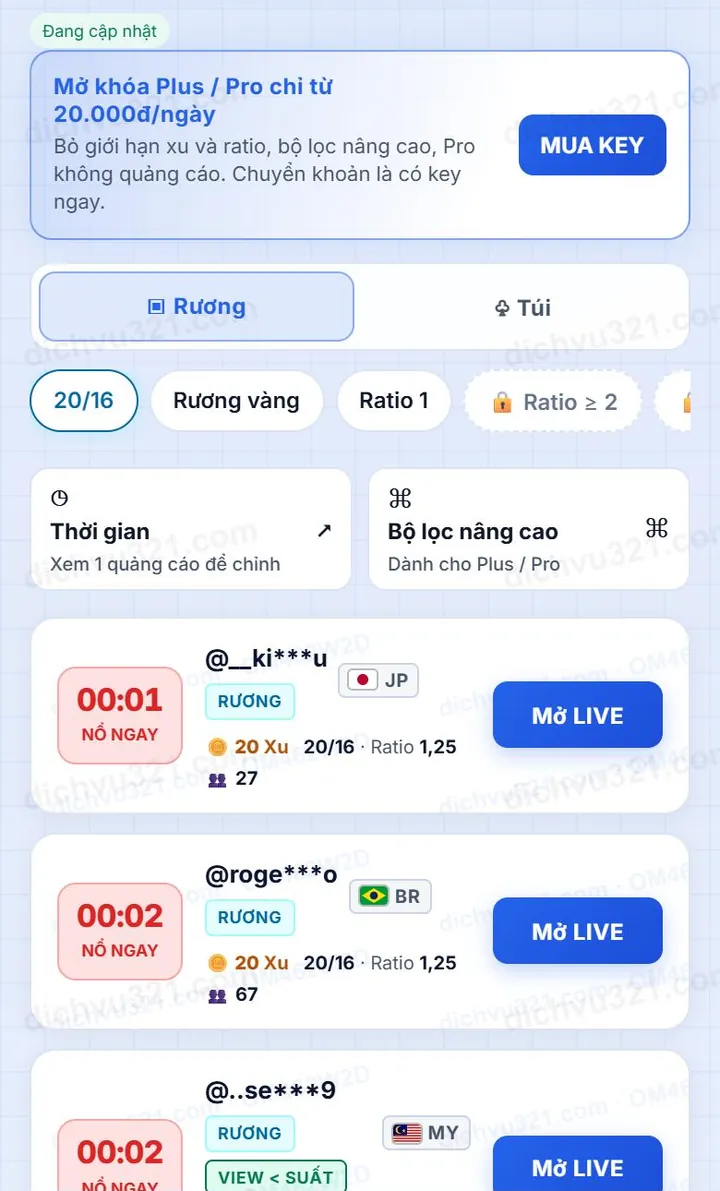
Filter TikTok treasure boxes by Coins, ratio and time
Box filtering on the LIVE page has three layers: a preset tab, the “Time” setting and, on Plus or Pro, “Advanced filters”. Compare total Coins and the ratio separately; a higher total does not guarantee a higher personal reward.
✓ Practical steps✓ Clear data definitions✓ You participate in TikTok
01
Filter TikTok treasure boxes by Coins, ratio and time
Open the LIVE page and select treasure boxes. The tab row below holds preset filters; a locked tab needs a higher plan, and higher plans include every tab of the lower ones. Box tabs only list boxes that are counting down; boxes past their opening time that nobody has opened are listed separately under “Hung boxes”.
“Ratio 1” (Free): total Coins equal the winner slots, so one Coin per slot.
“20/16” (Plus): ratio 1.2–1.25 with at least 20 Coins.
“Gold boxes” (Plus): gold boxes that are counting down.
“Ratio ≥ 2” (Plus): boxes with a ratio of 2 or more.
“Ratio ≥ 4” (Plus): boxes with a ratio of 4 or more.
“Hung boxes” (Plus): boxes past their opening time that nobody has opened.
“Lucky picks” (Pro): boxes with a ratio of 7 or more.
“Custom” (Pro): every box, filtered by the “Advanced filters” you set.
02
Separate total Coins from your own balance
Xu, or Coins, is the event total, not your account balance or a reservation. Do not add totals across rows as expected earnings. TikTok's Gifts guide explains Coins generally; after participation, check any personal result in TikTok. A listing screenshot cannot confirm a credit to your account.
03
Calculate the correct ratio for the event type
A ratio divides total Coins by winner slots. For a bag without winner slots, LiveMira divides by participants instead. Check the denominator for the event type; do not use View as the denominator. For example, 90 Coins and 45 winner slots gives a ratio of 2; a bag with no winner slots, 90 Coins and 90 participants gives a ratio of 1.
These figures express a relationship in the detected data. They are not probabilities, guaranteed equal shares or predictions of what you will receive. If the appropriate denominator is missing or zero, the ratio is unknown or invalid. Do not assign zero as a favourable substitute, and do not divide by viewer count.
04
Use the countdown to plan the handoff
The countdown indicates time remaining toward the listed event's opening, using the data available to LiveMira. It is not a timer that reserves participation for you. The list is sorted by opening time, earlier first. A row near the top may leave very little time to switch apps and read conditions.
If TikTok takes twelve seconds to open on your device, a five-second countdown is unlikely to leave useful preparation time. Plus and Pro can set “Time” directly (quick choices 0, 30, 60 and 120 seconds), and the setting is saved in the browser. Free would need a rewarded ad for each change, and rewarded ads are not available on the website yet, so Free users currently choose suitable countdowns manually.
05
Check freshness and the Free scope together
Website Free has the box tab “Ratio 1” and the bag tab “Level 2–10”. Plus adds “20/16”, “Gold boxes”, “Ratio ≥ 2”, “Ratio ≥ 4”, “Hung boxes” and the bag tabs “Level 1” and “Level 0”; Pro adds “Lucky picks” and “Custom” for boxes and bags. Free no longer has a 100-Coin or ratio-2 cap. Check Plans on the LIVE page for current access.
When you return from another app, check the update status before using a remembered row. Open TikTok and verify the event again. For missing information, describe the field and time observed rather than inventing a value. Start with the usage guide or the empty-list checklist if needed.
06
Start with the Free website list
Open the LIVE page, in your selected language, and choose Boxes. Read the countdown, Coins and ratio before pressing “Open LIVE”. Results are ordered by opening time, which provides a clear reading sequence. You can begin without setting up a separate Telegram bot.
On Plus or Pro, open “Advanced filters” while boxes are selected. Plus has “Minimum coins” and a LARGE BOX threshold that highlights big boxes. Pro adds “Minimum ratio”, “Box type”, “Box status” and “Filter boxes with fewer viewers than winning slots”, and uses them in the “Custom” tab. Free has no advanced filters and cannot set its own Coin or ratio threshold.
Free plan: locked tabs and the Advanced filters panel labeled “For Plus / Pro”.